






 Angličtina
 čínština (Čína)
 španielčina
 nemecký
 francúzsky
 taliansky
 japončina
 kórejský
 bulharčina
 grécky
 indonézsky
 čínština (Hongkong)
 ruský
 dánčina
 fínsky
 maďarský
 turecký
 holandský
 portugalčina
 švédsky
 rumunský
 nórsky
 chorvátsky
 český
 bengálsky
 poľský
 thajčina
 Ukrajinčina
 Vietnamci











































Režim živého vysielania
The C400 Pro supports live streaming to platforms such as Douyin and YouTube using the RTMP protocol.
RTMP Live Streaming Setup Guide
Requirements:
• Your streaming platform must provide an RTMP streaming URL.
• You need a Wi-Fi connection with internet access. Outdoors, use portable Wi-Fi or a personal hotspot from another phone.
Step 1: Obtain a Streaming URL
Create a live stream on your chosen platform and copy its RTMP streaming URL (usually beginning with rtmp:// or rtmps://).
Step 2: Enter the Streaming URL in the SJCAM X App
1. Open the SJCAM X App and confirm that the camera is connected.
2. Tap Live at the bottom of the App home screen.
3. Paste the RTMP streaming URL into the field, verify it, and tap Next.
(If you have already signed into YouTube through the App and retrieved streaming details, follow the on-screen instructions.)
Step 3: Set Up the Camera's Internet Connection in the SJCAM X App
Select the Wi-Fi network the camera will use to access the internet for live streaming:
• Android: Tap Change Network → choose the Wi-Fi network → enter its password → tap Next.
• iPhone: Manually enter the Wi-Fi network name and password → tap Next.
(Note: Wi-Fi names and passwords are case-sensitive. Enter both exactly.)
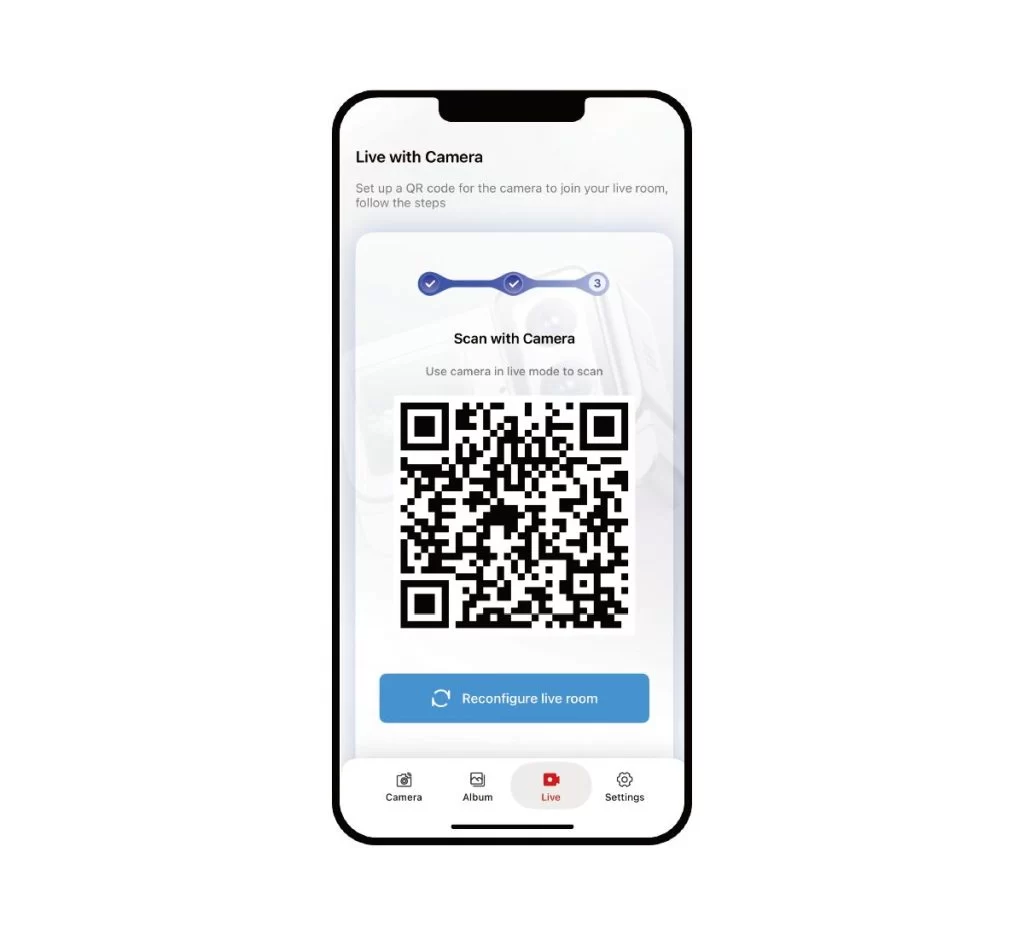
Once configured, the App displays a QR code containing the live-stream settings.
Step 4: Scan the App's QR Code with the Camera to Start Streaming
- Open the mode selector on the C400 Pro and select Live Streaming.
- Point the C400 Pro at your phone screen and scan the QR code generated by the App.
- The camera reads the configuration and connects to the network automatically. Streaming begins once the connection is established.
Často kladené otázky
1. What if Wi-Fi is unavailable outdoors?
Use a portable Wi-Fi router or a personal hotspot from another phone. Do not enable the hotspot on the same phone currently connected to the camera, as this may cause network conflicts.
2. Why does live streaming fail?
Check whether the Wi-Fi password is incorrect or the streaming URL has expired or become invalid. If the platform issues a new URL, generate a new QR code in the App and scan it again.
