






 Bahasa inggris
 Cina (Cina)
 Orang Spanyol
 Jerman
 Perancis
 Italia
 Jepang
 Korea
 Bulgaria
 Orang yunani
 Cina (Hong Kong)
 Rusia
 Orang Denmark
 Finlandia
 Hongaria
 Turki
 Belanda
 Portugis
 Orang Swedia
 Rumania
 Orang Slovakia
 Norwegia
 Kroasia
 Ceko
 Benggala
 Polandia
 Thai
 Orang Ukraina
 Orang Vietnam











































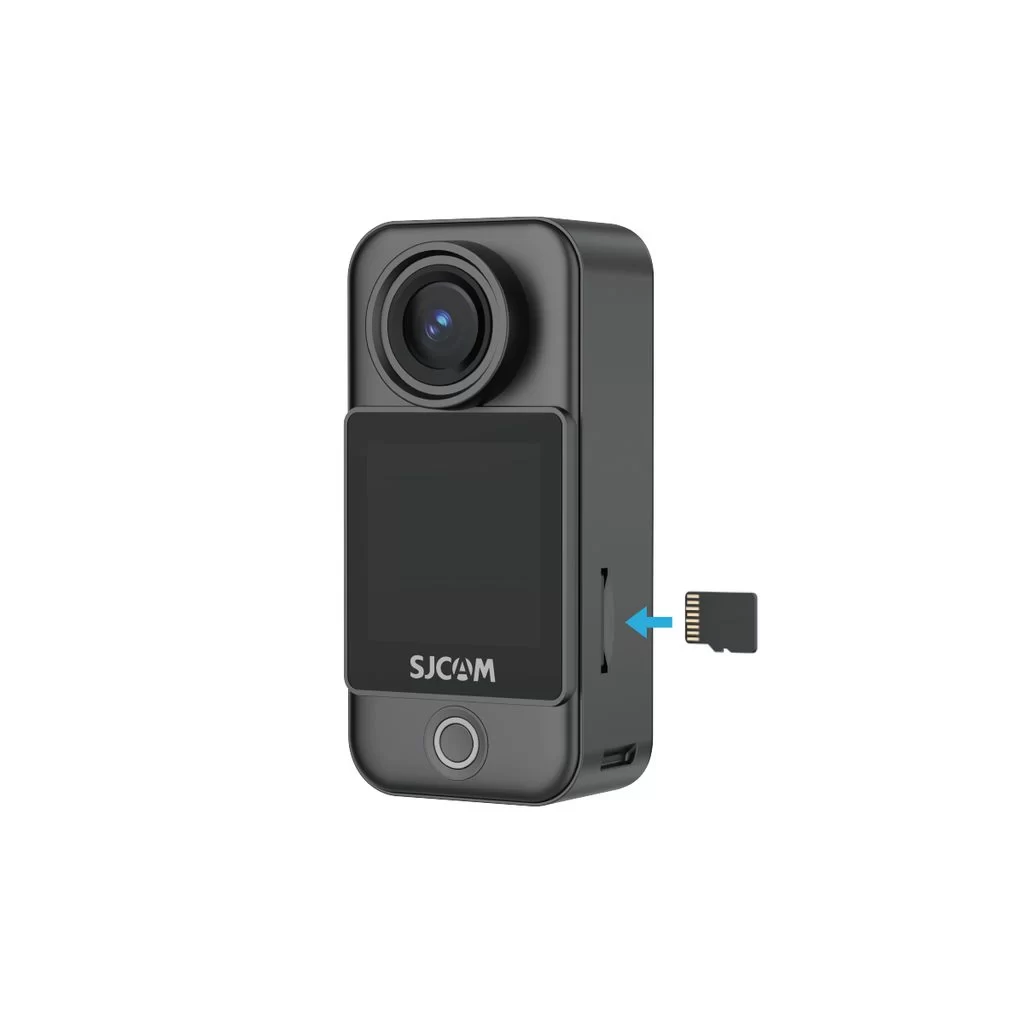
Memasang Kartu Memori
Insert a microSD Card
The camera uses a microSD card to store photos and videos. With the metal contacts facing inward, push the card all the way into the slot on the C400 Pro Pocket camera.
Use a UHS-I, V30, or higher-rated microSD/TF card formatted as exFAT. A card with insufficient read/write speed may cause recording to stop unexpectedly. Do not use UHS-II, UHS-III, or cards larger than 512 GB, as compatibility issues may disrupt recording.
Note: If the SD card will not fit, first check its orientation. If correctly aligned, you may use a SIM-eject tool to help push it in.
Apakah informasi ini bermanfaat?
Terima kasih atas masukannya!
