






 Angličtina
 čínština (Čína)
 španělština
 Němec
 francouzština
 italština
 japonský
 korejština
 bulharský
 řecký
 indonéština
 čínština (Hongkong)
 ruština
 dánština
 finština
 maďarský
 turečtina
 holandský
 portugalština
 švédský
 rumunština
 Slovák
 norský
 chorvatský
 bengálský
 polština
 thajština
 ukrajinština
 vietnamština











































Nastavení parametrů režimu
Shooting Settings: Tap Shooting Settings in the lower-left corner of the shooting screen to adjust resolution, image, and audio options for the current mode. Available options may change when you switch modes.
Camera Settings: Tap "Settings" in the bottom-right corner of the shooting interface to adjust system options, including language, date and time, and auto-power-off settings.
How to Choose Video Resolution and Frame Rate?
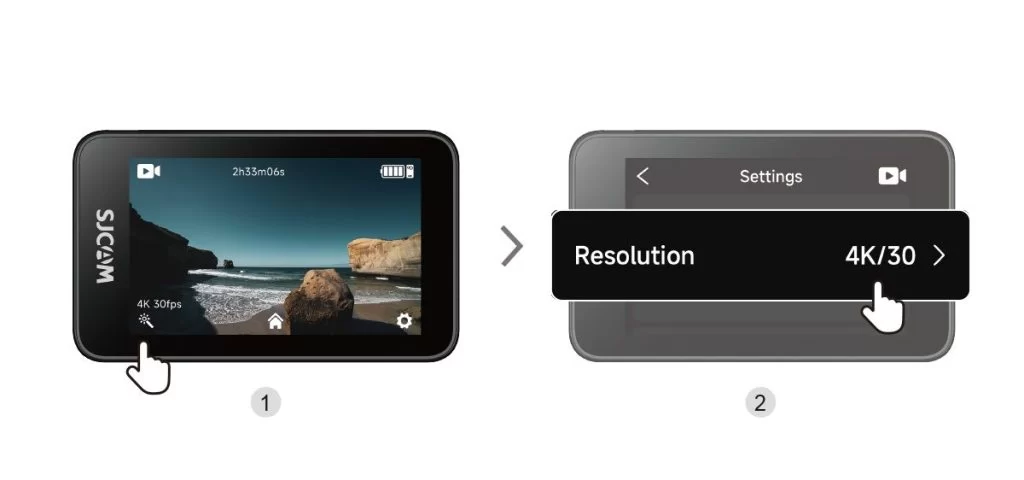
| Resolution (16:9) | Available Frame Rates |
| 4K | 3840 × 2160 | 30 snímků za sekundu |
| 2K | 2560 × 1440 | 60 / 30 fps |
| 1080p | 1920 × 1080 | 120 / 60 / 30 fps |
| 720p | 1280 × 720 | 120 / 60 / 30 fps |
Byly tyto informace užitečné?
Děkujeme za vaši zpětnou vazbu!
