






 ภาษาอังกฤษ
 ชาวจีน (ประเทศจีน)
 สเปน
 เยอรมัน
 ภาษาฝรั่งเศส
 ภาษาอิตาลี
 ญี่ปุ่น
 เกาหลี
 บัลแกเรีย
 กรีก
 ชาวอินโดนีเซีย
 จีน (ฮ่องกง)
 ภาษารัสเซีย
 ภาษาเดนมาร์ก
 ภาษาฟินแลนด์
 ภาษาฮังการี
 ภาษาตุรกี
 ภาษาดัตช์
 โปรตุเกส
 ภาษาสวีเดน
 โรมาเนีย
 สโลวัก
 ภาษานอร์เวย์
 โครเอเชีย
 เช็ก
 เบงกาลี
 ขัด
 ภาษายูเครน
 ภาษาเวียดนาม











































การตั้งค่าพารามิเตอร์โหมด
Shooting Settings: Tap Shooting Settings in the lower-left corner of the shooting screen to adjust resolution, image, and audio options for the current mode. Available options may change when you switch modes.
Camera Settings: Tap "Settings" in the bottom-right corner of the shooting interface to adjust system options, including language, date and time, and auto-power-off settings.
How to Choose Video Resolution and Frame Rate?
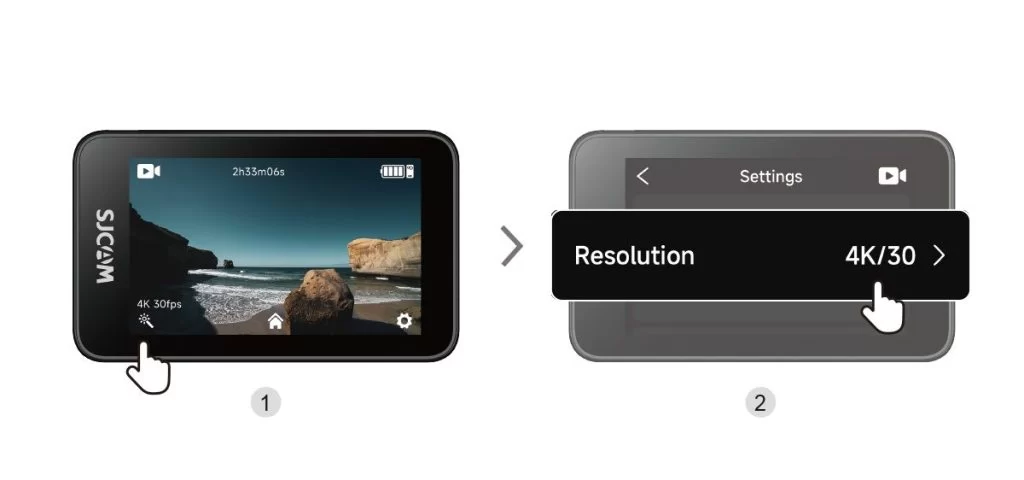
| Resolution (16:9) | Available Frame Rates |
| 4K | 3840 × 2160 | 30 เฟรมต่อวินาที |
| 2K | 2560 × 1440 | 60 / 30 fps |
| 1080p | 1920 × 1080 | 120 / 60 / 30 fps |
| 720p | 1280 × 720 | 120 / 60 / 30 fps |
ข้อมูลนี้เป็นประโยชน์หรือไม่?
ขอบคุณสำหรับข้อเสนอแนะของคุณ!
