






 Engleză
 Chineză (China)
 Spaniolă
 limba germana
 limba franceza
 Italiană
 japonez
 coreeană
 bulgară
 greacă
 indoneziană
 Chineză (Hong Kong)
 Rusă
 danez
 finlandeză
 maghiară
 turc
 olandeză
 portugheză
 suedez
 slovacă
 norvegian
 croat
 ceh
 bengaleză
 Lustrui
 thailandez
 ucrainean
 vietnamez











































Setări parametri mod
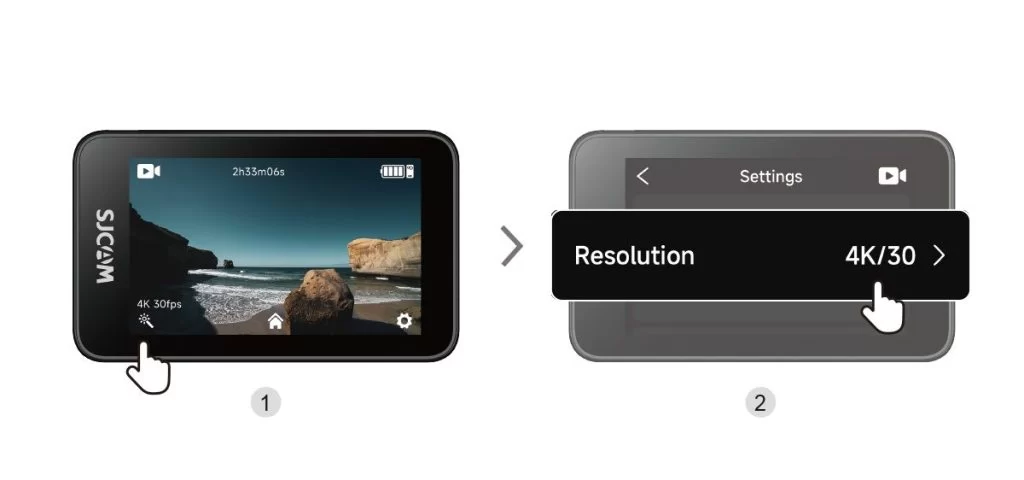
Shooting Settings: Tap Shooting Settings in the lower-left corner of the shooting screen to adjust resolution, image, and audio options for the current mode. Available options may change when you switch modes.
Camera Settings: Tap "Settings" in the bottom-right corner of the shooting interface to adjust system options, including language, date and time, and auto-power-off settings.
How to Choose Video Resolution and Frame Rate?
| Resolution (16:9) | Available Frame Rates |
| 4K | 3840 × 2160 | 30 cadre pe secundă |
| 2K | 2560 × 1440 | 60 / 30 fps |
| 1080p | 1920 × 1080 | 120 / 60 / 30 fps |
| 720p | 1280 × 720 | 120 / 60 / 30 fps |
V-au fost utile aceste informații?
Mulțumesc pentru feedback!
