






 ইংরেজি
 চাইনিজ (চীন)
 স্পেনীয়
 জার্মান
 ফরাসি
 ইতালীয়
 জাপানিজ
 কোরিয়ান
 বুলগেরিয়ান
 গ্রীক
 ইন্দোনেশিয়ান
 চীনা (হংকং)
 রাশিয়ান
 ড্যানিশ
 ফিনিশ
 হাঙ্গেরিয়ান
 তুর্কি
 ডাচ
 পর্তুগীজ
 সুইডিশ
 রোমানিয়ান
 স্লোভাক
 নরওয়েজীয়
 ক্রোয়েশিয়ান
 চেক
 পোলিশ
 থাই
 ইউক্রেনীয়
 ভিয়েতনামী











































প্লেব্যাক দেখা
You can view and manage all captured media on the camera or in the SJCAM X App.
View Playback on the Camera
১. কুইক মেনু খুলতে ক্যামেরা স্ক্রিনের ওপর থেকে নিচে সোয়াইপ করুন।.
2. Tap the Playback icon to open the album and browse your media.
3. Tap any item to preview a photo or play a video.
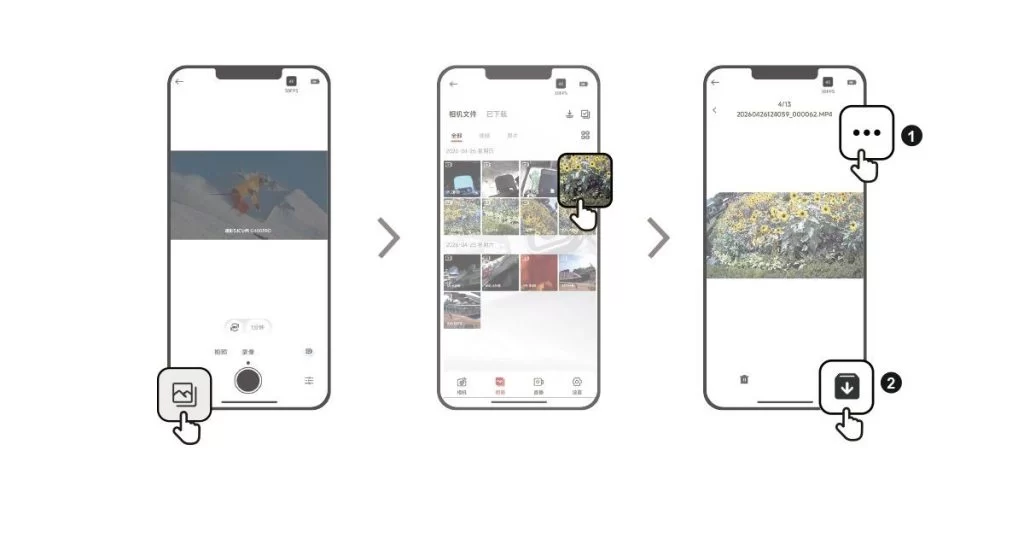
View Playback in the SJCAM X App
1. Connect the camera to the SJCAM X App.
2. Open the Album page to browse all the media captured by the camera.
3. Tap an item to open playback, then tap the download icon in the upper-right corner to save it to your phone's gallery.
এই তথ্যটি কি সহায়ক ছিল?
আপনার মতামতের জন্য ধন্যবাদ!
