






 Englisch
 Chinesisch (China)
 Spanisch
 Französisch
 Italienisch
 japanisch
 Koreanisch
 bulgarisch
 griechisch
 Indonesisch
 Chinesisch (Hongkong)
 Russisch
 dänisch
 finnisch
 ungarisch
 Türkisch
 Niederländisch
 Portugiesisch
 Schwedisch
 rumänisch
 slowakisch
 norwegisch
 kroatisch
 Tschechisch
 Bengali
 Polieren
 Thai
 ukrainisch
 Vietnamesisch











































Wiedergabe ansehen
You can view and manage all captured media on the camera or in the SJCAM X App.
View Playback on the Camera
1. Wischen Sie vom oberen Rand des Kamerabildschirms nach unten, um das Schnellmenü zu öffnen.
2. Tap the Playback icon to open the album and browse your media.
3. Tap any item to preview a photo or play a video.
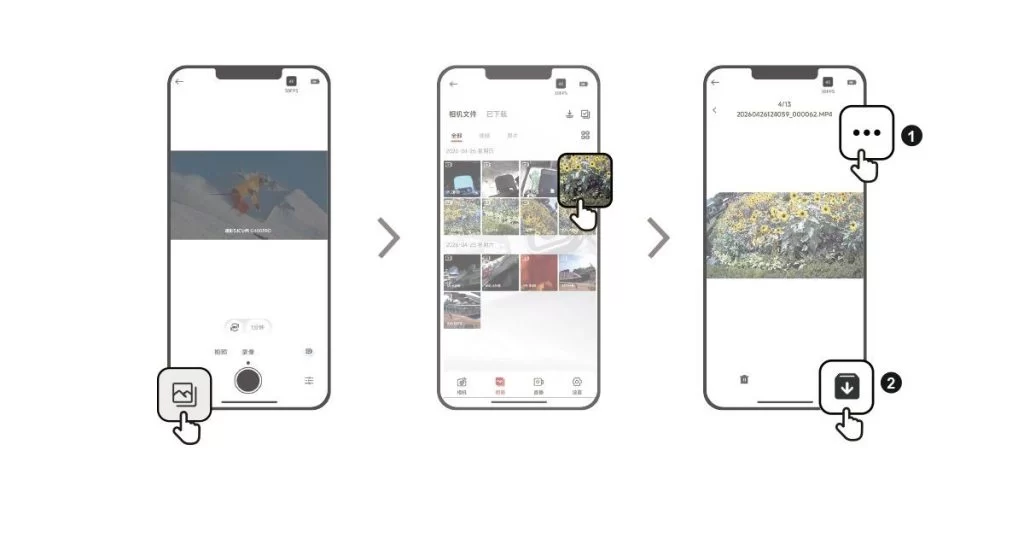
View Playback in the SJCAM X App
1. Connect the camera to the SJCAM X App.
2. Open the Album page to browse all the media captured by the camera.
3. Tap an item to open playback, then tap the download icon in the upper-right corner to save it to your phone's gallery.
Waren diese Informationen hilfreich?
Vielen Dank für Ihr Feedback!
