






 英语
 西班牙语
 德语
 法语
 意大利语
 日本人
 韩国人
 保加利亚语
 希腊语
 印度尼西亚
 中文(香港)
 俄语
 丹麦语
 芬兰
 匈牙利
 土耳其
 荷兰语
 葡萄牙语
 瑞典
 罗马尼亚语
 斯洛伐克语
 挪威
 克罗地亚语
 捷克语
 孟加拉
 抛光
 泰国
 乌克兰
 越南语











































观看回放
You can view and manage all captured media on the camera or in the SJCAM X App.
View Playback on the Camera
1. 从相机屏幕顶部向下滑动以打开快捷菜单。.
2. Tap the Playback icon to open the album and browse your media.
3. Tap any item to preview a photo or play a video.
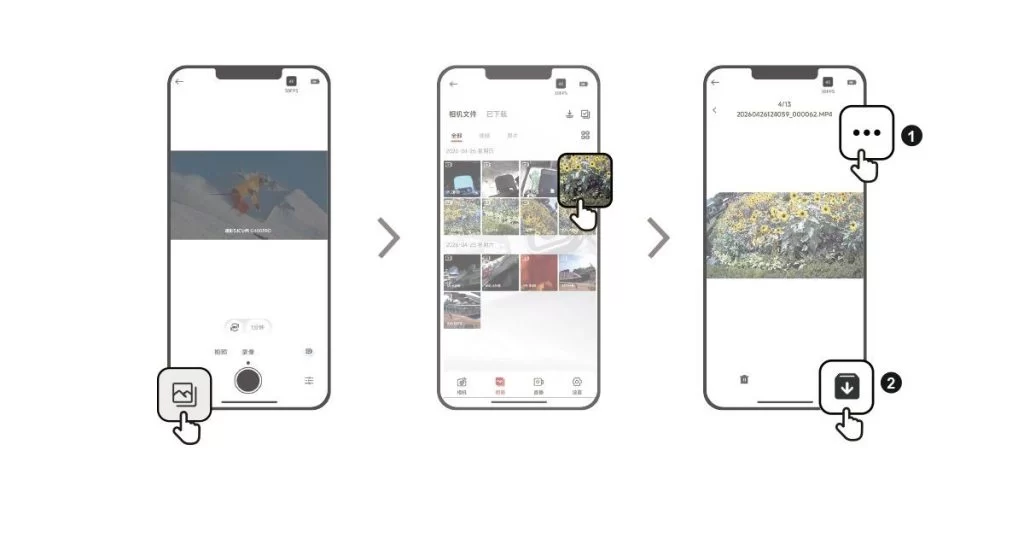
View Playback in the SJCAM X App
1. Connect the camera to the SJCAM X App.
2. Open the Album page to browse all the media captured by the camera.
3. Tap an item to open playback, then tap the download icon in the upper-right corner to save it to your phone's gallery.
这则信息有帮助吗?
感谢您的反馈!
