






 engelsk
 kinesisk (Kina)
 spansk
 tysk
 fransk
 italiensk
 japansk
 koreansk
 bulgarsk
 græsk
 indonesisk
 kinesisk (Hongkong)
 Russisk
 finsk
 ungarsk
 tyrkisk
 hollandsk
 portugisisk
 svensk
 rumænsk
 slovakisk
 Norsk
 kroatisk
 tjekkisk
 bengalsk
 Polere
 Thai
 ukrainsk
 vietnamesisk











































Visning af afspilning
You can view and manage all captured media on the camera or in the SJCAM X App.
View Playback on the Camera
1. Stryg nedad fra toppen af kameraskærmen for at åbne hurtigmenuen.
2. Tap the Playback icon to open the album and browse your media.
3. Tap any item to preview a photo or play a video.
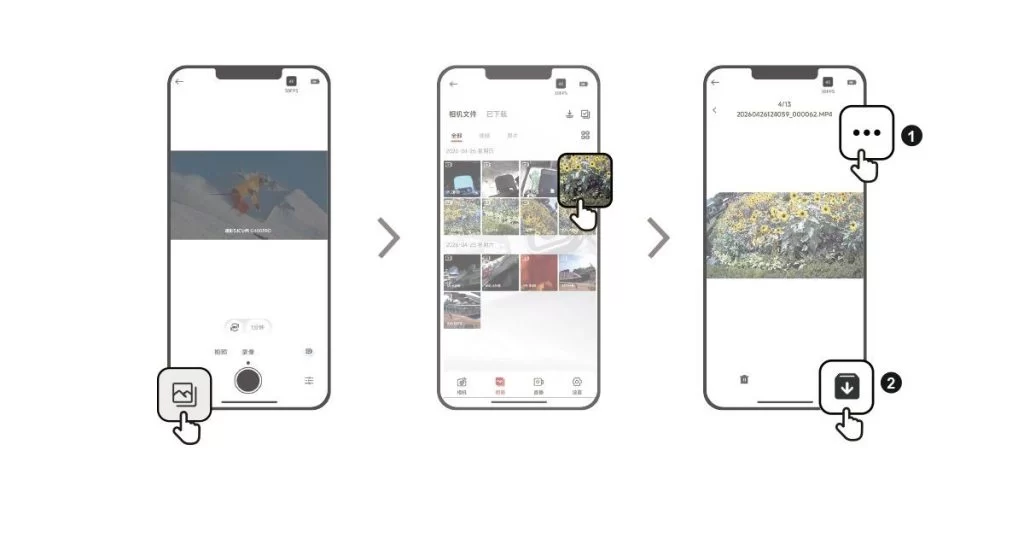
View Playback in the SJCAM X App
1. Connect the camera to the SJCAM X App.
2. Open the Album page to browse all the media captured by the camera.
3. Tap an item to open playback, then tap the download icon in the upper-right corner to save it to your phone's gallery.
Var disse oplysninger nyttige?
Tak for din feedback!
