






 Английский
 Китайский (Китай)
 испанский
 Немецкий
 Французский
 итальянский
 Японский
 Корейский
 болгарский
 Греческий
 индонезийский
 Китайский (Гонконг)
 датский
 финский
 Венгерский
 турецкий
 Голландский
 португальский
 Шведский
 румынский
 словацкий
 Норвежский
 хорватский
 Чешский
 Бенгальский
 Польский
 тайский
 украинец
 вьетнамский











































Просмотр Воспроизведение
You can view and manage all captured media on the camera or in the SJCAM X App.
View Playback on the Camera
1. Проведите пальцем вниз от верхнего края экрана камеры, чтобы открыть быстрое меню.
2. Tap the Playback icon to open the album and browse your media.
3. Tap any item to preview a photo or play a video.
View Playback in the SJCAM X App
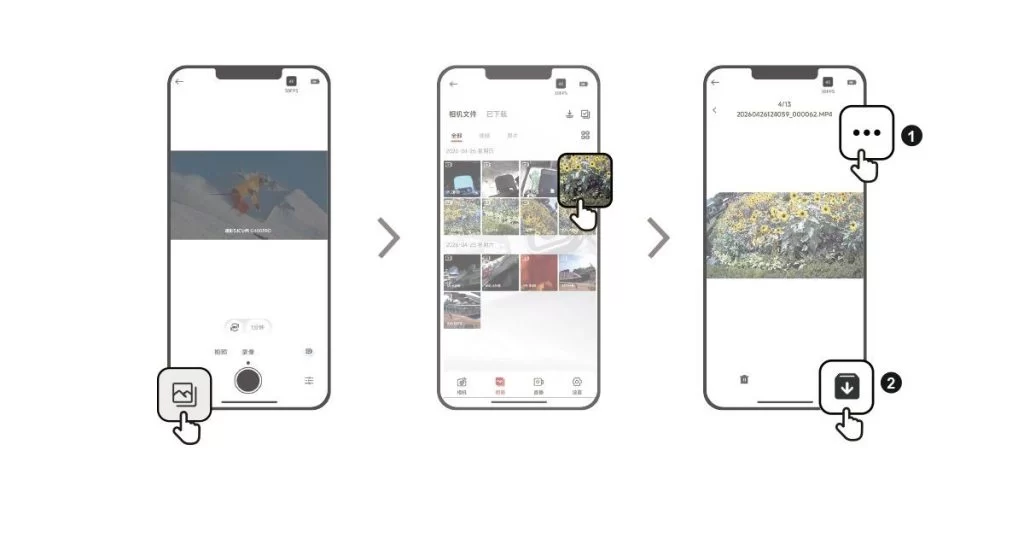
1. Connect the camera to the SJCAM X App.
2. Open the Album page to browse all the media captured by the camera.
3. Tap an item to open playback, then tap the download icon in the upper-right corner to save it to your phone's gallery.
Была ли эта информация полезна?
Спасибо за ваш отзыв!
