






 英語
 中国語(中国)
 スペイン語
 ドイツ人
 フランス語
 イタリアの
 韓国語
 ブルガリア語
 ギリシャ語
 インドネシア語
 中国語(香港)
 ロシア
 デンマーク語
 フィンランド語
 ハンガリー語
 トルコ語
 オランダの
 ポルトガル語
 スウェーデンの
 ルーマニア語
 スロバキア語
 ノルウェー語
 クロアチア語
 チェコ語
 ベンガル語
 研磨
 タイ語
 ウクライナ語
 ベトナム語











































再生画面を見る
You can view and manage all captured media on the camera or in the SJCAM X App.
View Playback on the Camera
1. Swipe down from the top of the camera screen to open the quick menu.
2. Tap the Playback icon to open the album and browse your media.
3. Tap any item to preview a photo or play a video.
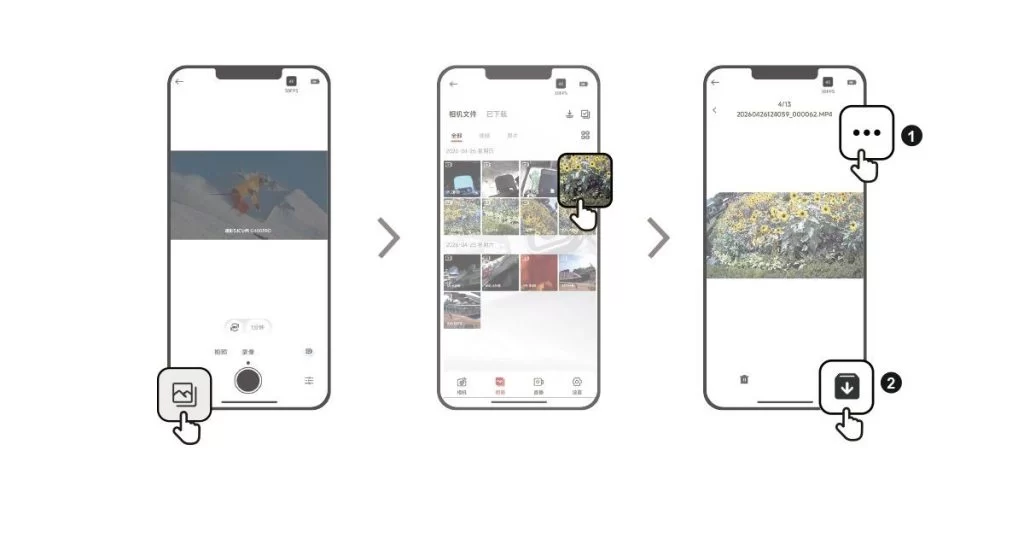
View Playback in the SJCAM X App
1. Connect the camera to the SJCAM X App.
2. Open the Album page to browse all the media captured by the camera.
3. Tap an item to open playback, then tap the download icon in the upper-right corner to save it to your phone's gallery.
この情報はお役に立ちましたか?
ご意見ありがとうございます!
